
Schedule an X thread with a publishing workflow that explicitly supports connected posts, then review each segment, image and timestamp before queuing it. Treat polls separately: X polls cannot include photos, and Reepl supports polls only in standalone posts, not thread segments. Confirm the actual thread after publication.
Key takeaways
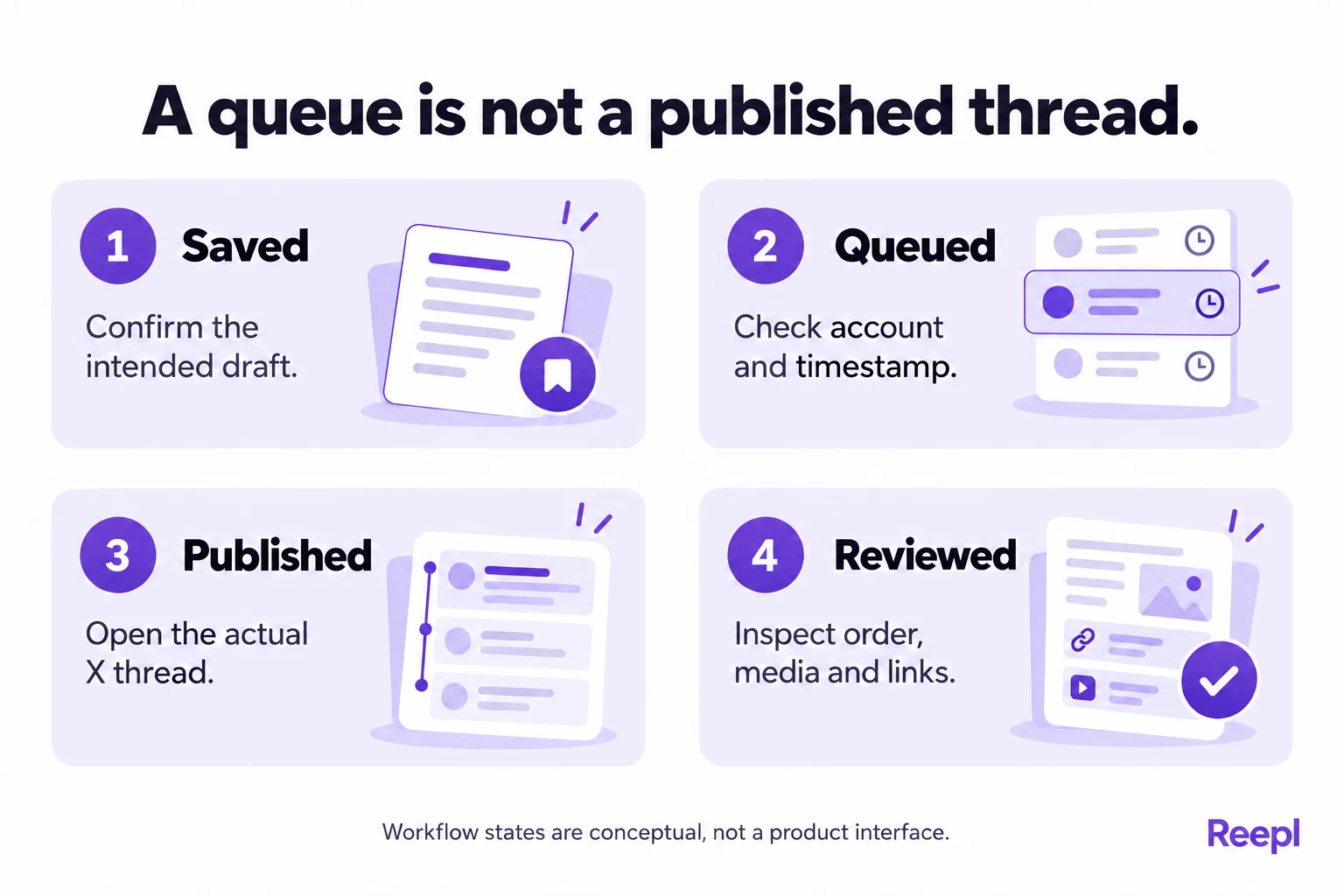
- Reepl supports polls in standalone posts; a saved draft, scheduled item and published thread remain different outcomes.
- Check every segment for complete wording, correct order, media and descriptive alternative text.
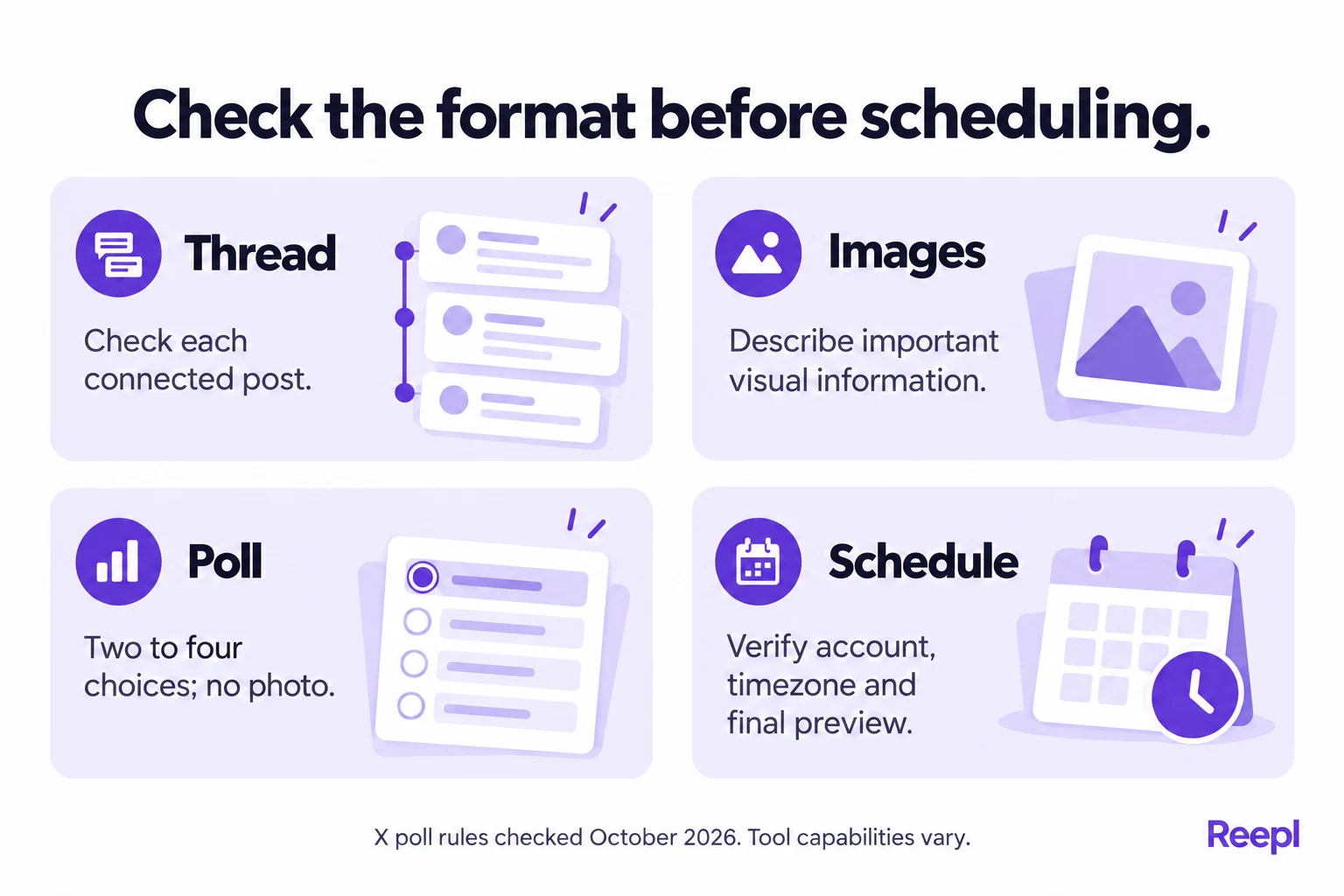
- X polls have two to four choices and cannot include photos.
- Confirm the account, timezone and publishing date before approving the schedule.
- After release, open the actual X thread and inspect its links and connected posts.
What do you need before scheduling an X thread?
You need a finished sequence, a connected X account and a publishing surface that supports the intended format. Start with the sequence. Scheduling an incomplete argument simply moves an editing problem into your calendar, where it becomes easier to overlook.
An X thread is a series of connected posts from one person. X's thread documentation explains native creation, saved drafts and adding posts to an existing thread. Those instructions establish how threads work, but do not document every scheduling tool's capabilities.
Write the whole argument before deciding how many segments it needs. Give each segment one job: introduce the problem, explain a step, show evidence or state a limitation. Delete repeated promises that encourage readers to continue without adding useful information.
Keep a reference copy outside the publishing queue. Include the final text, image files, image descriptions and destination links. If you need to repair a failed publication, this copy helps you identify the intended version without reconstructing it from an incomplete thread.
A connected account also needs the appropriate permissions. X's third-party app guidance explains that access depends on the permissions granted. Check the connection before a time-sensitive release, especially after changing account access or revoking an app.
Set aside a short editing session and a separate publication check. The effort depends on the length and media involved; there is no reliable universal completion time. A text-only announcement and a detailed visual walkthrough deserve different review budgets.
How do you prepare images for individual thread posts?
Attach each image to the segment whose point it supports. A reader should understand why the image appears there without searching several posts backward. Use the surrounding text to state the finding, then let the image provide detail or a concrete example.
For a product walkthrough, one image might show the original task flow and another the proposed revision. Label both clearly. If the screens are illustrative, say so rather than presenting a concept as a deployed product or an observed customer experience.
Check visual legibility at a small size. A screenshot with tiny navigation labels may look useful on your monitor but communicate little in a feed. Crop unnecessary surroundings, remove private information and preserve the elements needed to understand the point.
Add an image description for meaningful visual information. X's alternative-text guidance explains how descriptions help people using assistive technology and readers who need more context. Describe the relevant content, rather than repeating the post word for word.
For example, “Diagram showing optional profile settings moved after the first completed task” communicates the relationship. “Screenshot of an app” does not explain what changed. A chart description should mention the comparison and important qualification, not merely identify colors.
Media limits and combinations depend on the publishing surface and format. Check the actual preview and validation messages. An editor accepting several attachments does not establish that every mixture of photos, animation and video will publish successfully in the same post.
Review the thread without images as well. If the text becomes misleading when a reader cannot inspect the visual, add the missing explanation. The image can strengthen an argument, but the essential claim should remain understandable and accurately qualified.
What changes when your post contains a poll?
A poll is a different format from an image post. X's poll documentation, checked in October 2026, allows two to four options, with up to 25 characters per option. A poll lasts between five minutes and seven days, and photos cannot be included.
Those rules matter before you schedule anything. A draft that asks readers to vote on an attached photograph may require a different structure. Explain the choices in text, or place a useful visual in another post without implying that it is part of the poll itself.
Keep the question focused on one decision. “Which setup step needs a clearer explanation?” can produce interpretable answers. Combining usefulness, price and preferred design into one question makes the result difficult to act on, even if many people vote.
Make the choices distinguishable. “Too slow” and “Takes too long” overlap, while “Finding the setting” and “Understanding the setting” describe different problems. Include an appropriate alternative when the named choices would otherwise force a misleading answer.
| Format | Main check | Common editing mistake |
|---|---|---|
| Text thread | Every segment belongs to the sequence | Repeating the opening promise |
| Image segment | The visual supports the local claim | Hiding essential context in tiny text |
| Poll | Choices and duration fit the question | Assuming a photo can be attached |
| Poll near a thread | The publishing workflow supports the arrangement | Assuming all thread segments support every format |
X also states that individual voting choices are private. Do not promise to identify which readers selected an option or treat the results as a list of potential customers. A poll is an invitation to express a preference, not permission for unrelated contact.
Treat a poll result as feedback from participating readers. It is not automatically a representative market study. Record the question, choices and circumstances so that a later post does not turn an informal response into a stronger claim than the exercise supports.
How should you choose and check the publishing time?
Choose a time that fits your audience and your ability to inspect the result. There is no universal timestamp that makes a weak thread useful. For a launch, the correct time may depend on when the destination page and support resources are actually ready.
Read the date and timezone together. “Tuesday morning” is ambiguous when a teammate, workspace and audience use different locations. Write a complete timestamp in your planning note and confirm the scheduler's displayed interpretation before saving.
If daylight-saving changes are relevant, inspect the calendar date instead of reusing a remembered offset. For recurring editorial planning, a local-time convention can be easier for people to follow, but the publishing tool still needs the intended timezone explicitly configured.
X's scheduled-post help describes scheduling through X Ads and managing scheduled campaign posts. It is useful documentation for that surface. It should not be read as a promise that the ordinary composer or every external service has identical controls.
When using a scheduler, check whether you are saving a draft, choosing a queue slot or assigning a specific time. Those actions can look similar while producing different outcomes. Return to the schedule after saving and confirm the intended item is there.
If the timing depends on uncertain events, keep the thread as a draft until the dependency is resolved. Publishing a prepared explanation after the product is available is better than posting an inaccurate claim because a calendar slot was reserved earlier.
What does a complete scheduling workflow look like?
Reepl is an AI writing platform that puts your social media on autopilot in your own voice: it finds what to post about, drafts your posts, and keeps your calendar full, with you choosing what it does without asking.
For your own connected account, the English composer follows this sequence. Check the controls available in your workspace; approval requirements can change the action shown. Keep your reference draft nearby while reviewing the account and publishing time.
- Select X (Twitter) in the composer and confirm the intended account.
- Write the opening post, choose Start thread, then use Add tweet for additional segments. Attach media to the relevant segment.
- Review Preview, including text order, images and descriptions. For a poll, use a separate standalone draft: Reepl’s thread editor does not offer polls.
- Choose Schedule, then Schedule Manually in the publishing dialog. Select a future date and time and check the displayed timezone.
- Confirm with the button displaying the selected date and time. Return to the calendar or scheduled list and verify the item is marked Scheduled, rather than saved only as a draft.
- After publication, use the published post's viewing action to open its live X URL. Inspect the complete connected thread, attachments and destination links.
Consider an illustrative founder preparing a thread about a revised onboarding checklist. The first post names the problem, the second explains the original sequence, the third shows the proposed change, and the last asks a specific question about the reader's own workflow.
The founder initially plans a poll for the visual segment. During review, the combination fails the format check. The founder changes the plan: keep the image explanation in the thread and schedule the poll as a separate standalone post.
The team also notices that the linked help page still describes the old process. They update that page before choosing a publishing time. Without this check, the thread would have created conflicting instructions even if every segment published correctly.
Use a practical release record:
| Field | What to record |
|---|---|
| Account | The X profile that should publish |
| Purpose | The reader task and next action |
| Version | The final reviewed draft |
| Media | File and description for each segment |
| Timing | Date, time and timezone |
| Dependency | Any page or product change required first |
| Verification | Who will inspect the live thread |
Keep the record brief enough to maintain. The purpose is to prevent avoidable confusion, not create a reporting project larger than the post. Our founder content-calendar guide provides an adjacent planning method you can adapt while retaining X-specific format checks.
How do you confirm that the scheduled thread published?
Confirm publication by opening the actual X thread. A queue entry shows what was planned; a success notification reports a publishing action. The live destination shows what readers can now see, including the sequence, media and links.
Inspect the opening post first, then follow the connections through the full argument. Look for missing segments, duplicated wording, an unexpected account, broken attachments or a link that points somewhere different from the preview. Check the ending as carefully as the hook.
If something is missing, inspect the scheduler's status before submitting another copy. Repeatedly selecting publish can make the problem harder to understand. Identify what is already live, preserve the correct posts and choose a repair based on the observed state.
A partially published thread needs editorial judgment. A missing final qualification can make an earlier claim misleading, while a missing decorative image may be less urgent. Prioritize restoring accurate meaning and give readers a correction when the original wording could confuse them.
X's automation rules apply to scheduled activity as well as other automated actions. Avoid repeated duplicate posts as a troubleshooting method. A clear review and repair process is more useful than treating every failure as a reason to resubmit everything.
Do not judge success from views alone. X's view-count explanation says repeated views may count and counts are not all unique. Publication verification asks whether the intended material is available and accurate; performance review is a separate task.
How can you keep scheduled posts useful without extra complexity?
Keep a small queue of reviewed material and a clear owner for checking it. A long queue creates more opportunities for examples, links or claims to become outdated. Review upcoming posts whenever a product decision or external event changes their relevance.
For an X publishing workflow, check the connected account and the options available in your composer before planning mixed formats. Keep final review under your control. No scheduler removes the need to understand a poll restriction or verify a time-sensitive statement.
Use recurring review questions instead of adding more notifications: Is the claim still true? Is the resource available? Is the intended reader clear? Does the schedule still make sense? Those checks apply whether you publish manually or use a calendar.
When you adapt material from another channel, edit it before scheduling. Our content-repurposing guide explains how to preserve the useful idea while changing its presentation. An X thread needs a connected sequence, not an arbitrary division of a longer paragraph.
Continue with our guides to choosing between X threads and Articles and measuring results after publication.
Put your next idea into words
Draft in your voice, review the details, and choose what to publish.

![A LinkedIn® content calendar for busy founders [Free template]](/blog-images/linkedin-content-calendar-for-founders/cover-v2.webp)