A LinkedIn® content calendar for a busy founder ties every planned post to a source, a reader problem, a draft owner and a review deadline. Start with three slots a week, or two if review gets tight, collect sources from your normal work, draft in one batch, and copy the free four-week template below.
Key takeaways
- Each row is one post brief: a reader, a question, one main point, an approved source, an owner, a review deadline and a status.
- Three weekly slots give 12 posts across four weeks; drop to two when you can only review two drafts properly.
- Week one is ready to publish, week two is ready to draft, and weeks three and four stay provisional.
- A suggested weekly budget of about an hour (15 minutes choosing sources, 30 drafting, 15 reviewing) covers short text posts; research-heavy posts get their own task.
- When a week gets busy, cut volume before you cut the accuracy check.
- Review production (where work stalled) separately from reader outcomes (questions, conversations, follow-up).
What should a founder's content calendar contain?
A founder's calendar holds enough information to draft and approve each post without reopening the original planning discussion. In practice that means one row per post, with the fields in the blank template below.
A content calendar is a working schedule that connects planned publications with their material, owners and production status. For a founder, the practical unit is a post brief: one audience problem, one point worth making and the evidence behind it.
Use a document or spreadsheet you will actually maintain. The template below includes the fields needed to move a brief from an idea to publication.
Keep private sources in approved storage and reference them in the calendar. GOV.UK’s research privacy guidance recommends restricting raw research data to people who need access.
Decide who the month is for before filling the rows. The illustrative calendar in this article belongs to a hypothetical founder of a purchase-approval tool, writing for operations leads at mid-size manufacturers. Its posts explain the founder's judgment about who owns each decision.
Our 30 post ideas for founders offer specific subjects drawn from real work. The calendar turns selected ideas into work someone can complete.
How often should a busy founder plan to post?
Plan the number of posts you can support with real material and careful review. This template uses Monday, Wednesday and Friday as placeholders; pick the days when you can review drafts and answer replies.
Three posts per week create 12 slots across four weeks. If you can only review two useful drafts a week, use two slots and leave the third empty.
Assign a publication time in your audience's time zone once you choose actual dates, and pick a time when you can respond to readers that day.
Make week one ready to publish, week two ready to draft, and the remaining weeks provisional. Mark the difference in the status field so tentative plans are not mistaken for approved posts.
What does a filled four-week calendar look like?
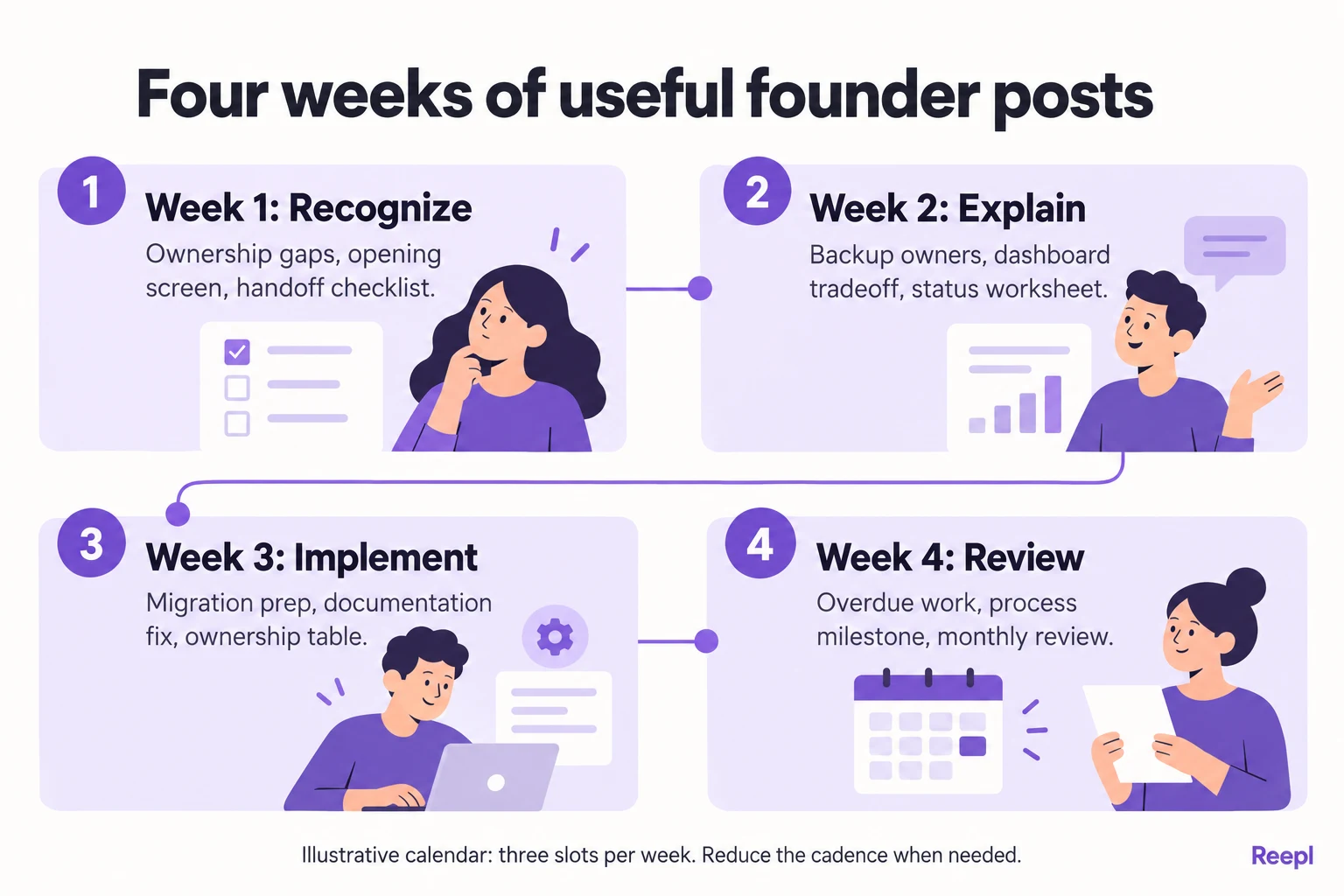
The following calendar is illustrative. The purchase-approval founder, source documents, decisions and opening lines are invented examples for you to adapt; replace them with your own verified material before publishing. Each row gives the drafter a specific argument: Monday explains a buyer problem, Wednesday shows a decision and Friday provides something practical.
Week one: make the problem recognizable
| Day | Post brief and sample opening | Source to gather | Reader's next step |
|---|---|---|---|
| Monday | Explain why approvals stall when ownership is unclear. Opening: “An approval deadline cannot fix an unnamed decision owner.” | Anonymized discovery notes about handoffs | Name an owner for one open approval. |
| Wednesday | Explain the choice to show an owner beside every pending item. Opening: “We put the owner's name ahead of the progress chart.” | Product decision note comparing the two layouts | Check which information colleagues need to act. |
| Friday | Share a handoff checklist: owner, due date and escalation contact. Opening: “Before handing over a request, fill in these three fields.” | A blank handoff checklist with dummy data | Copy the checklist into one workflow. |
For the Wednesday slot, the founder must actually have made the decision described. If the evidence supports only a proposal, rewrite the post around what the team is considering and why, so the calendar keeps a completed change distinct from an intention.
Week two: explain the choices behind the product
| Day | Post brief and sample opening | Source to gather | Reader's next step |
|---|---|---|---|
| Monday | Explain when an approval workflow needs a backup owner. Opening: “The process works until the only approver is away.” | Support question about absence coverage | Assign a backup for one critical decision. |
| Wednesday | Discuss postponing custom dashboards until status definitions agree. Opening: “A new chart would have repeated our definition problem.” | Roadmap note showing the dependency | Define what “overdue” means before reporting it. |
| Friday | Share a status-definition worksheet with examples and exceptions. Opening: “Write down what each status allows someone to do next.” | A blank internal glossary adapted for readers | Review one ambiguous status with a colleague. |
This week's sequence revisits a theme through different jobs: recognize the problem, understand a tradeoff and use a worksheet. Check that each post stands alone.
Week three: make implementation concrete
| Day | Post brief and sample opening | Source to gather | Reader's next step |
|---|---|---|---|
| Monday | Explain what to settle before importing existing requests. Opening: “Before moving the records, decide which ones still need action.” | Migration preparation notes | Separate active requests from historical records. |
| Wednesday | Explain a missed help-document update and the release check added afterward. Opening: “The setting changed. The instructions did not.” | A retrospective cleared for public discussion | Add documentation ownership to the release checklist. |
| Friday | Share a migration ownership table covering validation and sign-off. Opening: “Every migration task needs a named checker.” | A blank implementation responsibility table | Assign who checks the first imported sample. |
The mistake post needs particular care. Keep responsibility with the process and its owner, and never publish an employee's error or a customer's private difficulty as a convenient story. If the real retrospective cannot be discussed, replace the row with a general checklist explanation.
Week four: review and refine the process
| Day | Post brief and sample opening | Source to gather | Reader's next step |
|---|---|---|---|
| Monday | Answer a question about overdue work without blaming the approver. Opening: “An overdue request may be missing information.” | A recurring question plus documented status rules | Check whether the request is ready for a decision. |
| Wednesday | Explain a small milestone: documenting the first complete handoff process. Opening: “The milestone was a process someone else could follow.” | Approved process document and its scope | Test whether a colleague can follow one written handoff. |
| Friday | Share a monthly workflow review with three questions. Opening: “Which requests stalled, why, and what will change?” | A blank review agenda | Run a short review of one completed cycle. |
Keep these final rows provisional until the preceding weeks reveal better questions. A relevant reader question may deserve the Monday slot.
How do you copy the blank calendar template?
Download the four-week calendar (CSV)
Copy the table below into a spreadsheet and duplicate the rows until you have the number of posts you can support. The four-week example uses three rows per week; this blank version also works for a lighter schedule.
| Week | Publish date and time zone | Intended reader | Question or problem | Main point | Source reference | Format | Draft owner | Review deadline | Status | Reader action | Follow-up notes |
|---|---|---|---|---|---|---|---|---|---|---|---|
| 1 | [Date, time, zone] | [Role] | [Specific question] | [One sentence] | [Approved source] | [Text or visual] | [Name] | [Date] | Source needed | [Useful next step] | [Complete after publication] |
| 1 | [Date, time, zone] | [Role] | [Specific question] | [One sentence] | [Approved source] | [Text or visual] | [Name] | [Date] | Source needed | [Useful next step] | [Complete after publication] |
| 1 | [Date, time, zone] | [Role] | [Specific question] | [One sentence] | [Approved source] | [Text or visual] | [Name] | [Date] | Source needed | [Useful next step] | [Complete after publication] |
Use a small set of statuses: source needed, ready to draft, in review, approved, scheduled and published. Add blocked when a dependency prevents progress.
“Approved” should mean the actual draft has been checked, not merely that someone liked the topic.
Where should the source material come from?
Collect sources during ordinary work. After a useful customer conversation, record the question, your answer and whether the underlying situation can be discussed publicly.
After a product decision, save the alternatives and your reason. GOV.UK’s guide to sharing findings recommends recording essential facts, their importance and consequences: useful ingredients for a source note.
Keep a short source note for each candidate:
- What happened or what question needs answering?
- What can the source actually establish?
- Which details need permission or removal?
- What would the intended reader do differently after reading?
Write down what each source can actually show. A support question shows that one person was confused. A roadmap note shows why you postponed a feature. Neither tells you how many customers share the problem or what the choice will achieve, so keep posts to what the source shows.
Existing writing is another source. An implementation guide may contain several distinct explanations, each suitable for its own post.
Our newsletter repurposing guide explains how to adapt an existing issue into distinct posts. Keep the original context attached so a shortened version does not change the meaning.
How do drafting and review fit into a founder's week?
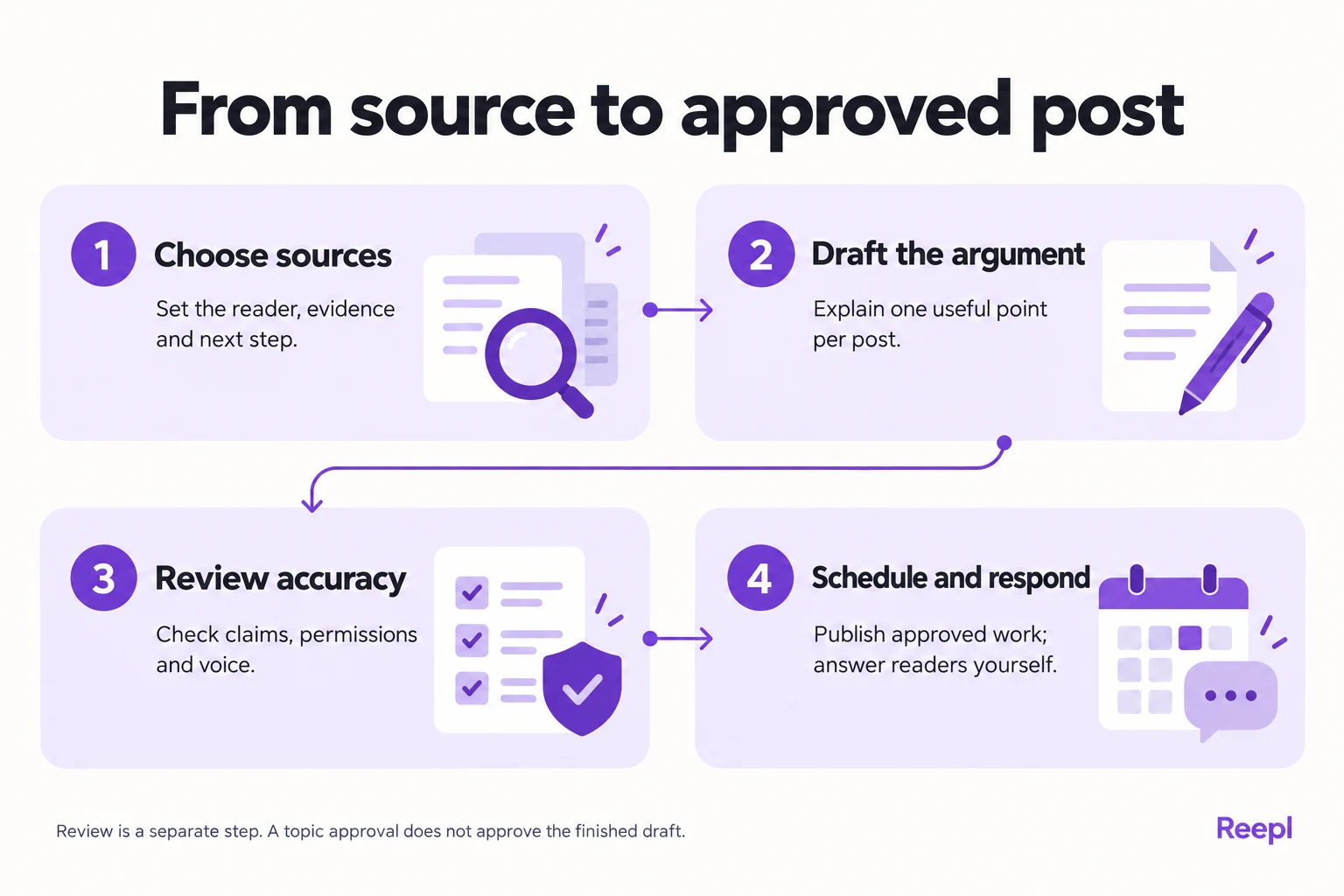
Use one recurring planning block and a separate approval block. Start with this suggested time budget for short text posts, then adjust it to your own posts.
Step 1: choose the next three sources
Allow 15 minutes to review recent notes and fill the next week's briefs. Reject rows that have a topic but no defensible point.
Confirm the audience, source and reader action before drafting. If the evidence needs permission, assign that request and mark the row blocked until it is resolved.
Step 2: draft one complete argument per row
Allow 30 minutes for a first batch of short drafts. Use the sequence: situation, explanation, practical next step.
If a post needs extensive research or a custom visual, give it its own task and its own time. Keep a link to the source beside the draft.
A hypothetical note might say, “Requests pause when the named approver is away.” The draft can explain when a backup owner is needed and offer a checklist. Leave out any customer quote or turnaround improvement the source does not contain.
Step 3: review accuracy before polishing the opening
Allow 15 minutes for the founder's review. Check what happened, who can be identified, whether the example is labeled correctly and whether the promised next step appears in the post.
Read the draft aloud to catch language the founder would never use. Review visuals for private details as well as wording.
If someone else drafts for you, keep approval explicit. Ask the writer to flag missing evidence and leave each gap visible, because a polished sentence can still carry an assumption you would never make in a customer conversation.
Step 4: schedule approved posts and reserve follow-up time
Confirm the final scheduled dates only after the final draft is approved. Before publication, check whether launches, incidents or changing circumstances make the post inappropriate or inaccurate.
Schedule a small block to read and answer relevant responses yourself. Treat it as conversation time, with no reply quota.
What should change when the week becomes busy?
Reduce the publishing plan before you cut the accuracy check. Use this table when the week fills up:
| If this week | Do this |
|---|---|
| You can review only one or two drafts | Publish those and leave the other slots empty. |
| A draft is unfinished | Move it to next week with its status unchanged. |
| A slot is empty and an evergreen post is approved | Recheck its claims, then use it. |
| Nothing is ready | Skip the week and resume at the next planning block. |
Keep one spare post based on a question that stays useful over time, and review it before reuse, especially if it names product behavior. A checklist about decision ownership stays relevant longer than an announcement about a release date.
At the end of the month, compare planned posts with published posts and record where work stalled. Keep later briefs editable, and review scheduled posts whenever circumstances change.
How do you prevent calendar statuses from becoming misleading?
Give every status a condition that another person can check. “Ready” is ambiguous when it might mean the idea exists, the draft is written or the founder has approved it. A calendar works better when status names describe completed actions and the next owner is visible.
Define each status by the action that completes it:
| Status | Enter it when | Next owner |
|---|---|---|
| Source needed | The row has a topic but no approved source. | Founder |
| Ready to draft | The row has a source and one defensible point. | Drafter |
| In review | The complete text and any visual are attached. | Reviewer |
| Approved | The accountable reviewer accepted that exact version. | Scheduler |
| Scheduled | Date, time and time zone are set. | Founder, for the pre-publish check |
| Published | The live post has been opened and checked. | Founder, for replies |
| Blocked | A named dependency stops progress. | Whoever owns the dependency |
A substantive change to the claim, source, image or call to action sends the row back to review.
Apply these rules in your own working document. If your scheduling product cannot record the version, keep a copy of the approved text beside the row. For a solo founder, the same rule stops an older draft from slipping into the queue after you corrected it elsewhere.
When a row changes hands, add a short status note: “The post explains backup ownership. The source is the approved support summary. The open question is whether the example can name the customer. Hold scheduling until that question is resolved.” That note tells the next person exactly what remains, which a cell reading “almost done” never does.
How should you handle a launch, incident or missing source?
Keep a change rule beside the calendar, so the public schedule adapts when the business changes. Move or drop a slot whenever the underlying facts shift.
| Change | Calendar action | Publication check |
|---|---|---|
| A launch moves | Pause announcements and dependent examples. | Confirm the actual release state before changing dates. |
| A source cannot be disclosed | Block the row or replace it with a general explanation. | Label any replacement example as illustrative. |
| An incident affects customers | Review scheduled promotional posts. | Prioritize direct operational communication. |
| A reviewer is unavailable | Move the post or use a previously approved evergreen draft. | Check that its claims remain current. |
Consider an illustrative Wednesday product-decision post that describes a new default as already available. On Tuesday, the release is postponed. Changing Wednesday to Friday in the calendar is insufficient: the release may still not be ready. Change the row to blocked, name the release owner and require a fresh availability check before publication.
The LinkedIn® Professional Community Policies, consulted in October 2026, prohibit false or misleading content. A post scheduled early still needs its factual claims checked on the day it appears.
For an uncertain product decision, a different post may work. Explain what you are evaluating and the tradeoff you expect, worded as a proposal. If a release slips, say so or move the post, and let the month's topic mix change with it.
How do you review a month without confusing activity with results?
Review production and reader outcomes separately. Production notes explain whether the calendar fits your working life. Reader outcomes help decide which problems deserve another post. Combining them too early can make an easy-to-produce topic look effective simply because you published it frequently.
For production, count which planned rows reached publication and record the reason for each delay. Source collection, approvals, visual design and scheduling failures require different fixes. If most delays happen before drafting, generating more text will not solve the problem. Reduce the planned volume or improve how you collect evidence.
For reader outcomes, capture substantive questions, relevant conversations and identifiable next steps. If the post links to a guide or trial page, Google Analytics documents campaign URL parameters for labeling traffic sources and campaigns. Use consistent labels when your analytics setup supports them. A tagged visit records a click path; it cannot show that the post created the person's original interest, and a sale in the same month is no evidence that the post caused it.
Make each worksheet link descriptive. W3C recommends meaningful link text that explains the destination. “Download the blank migration checklist” tells readers more than “resource here.” In your own calendar, record whether the asset is public, requires registration or has changed location, so the next reviewer can test the promised action.
Finish the monthly review with concrete changes to the next calendar, drawn from your own records. Fill in this note while the reasons are still clear:
- Planned: [number] posts. Published: [number].
- Stalled at: [source, approval, visual or scheduling], and why.
- Reader questions worth a post: [list, paraphrased].
- Keep: [topic], because [reader evidence].
- Change: [one slot, topic or deadline].
For the purchase-approval founder, that might mean keeping the backup-owner topic because readers asked about exceptions, removing one weekly slot because approval time ran short, and replacing a generic launch announcement with a worked setup example.
Copy the blank template, choose three real source documents and fill the first week before planning the rest of the month.
Turn your ideas into useful posts
Draft from your own knowledge, check the facts and keep control of what you publish.