Useful LinkedIn® post ideas for founders start with work you can explain: a customer question, a product tradeoff, a mistake you corrected or a milestone with a lesson. Choose one specific moment, add the evidence behind your decision, and give readers something they can apply to their own situation.
Key takeaways
- Start with a source document or remembered decision before choosing an opening line.
- Turn customer questions into practical explanations without exposing private information.
- Explain the alternatives behind product choices so readers can judge your reasoning.
- Pair mistakes and milestones with what changed afterward.
- Adapt these 30 ideas to events you can substantiate; the examples below are illustrative.
Where should founders look for post ideas?
Look in the places where your judgment already appears: call notes, support replies, product specifications, retrospective documents and release notes.
Choose material that helps a reader you want to reach. Write the intended reader beside each idea before drafting.
The examples throughout this article are hypothetical, including sample opening lines. Replace them with your own facts and phrasing.
If an example never happened to you, use it as a question to investigate rather than a story to publish.
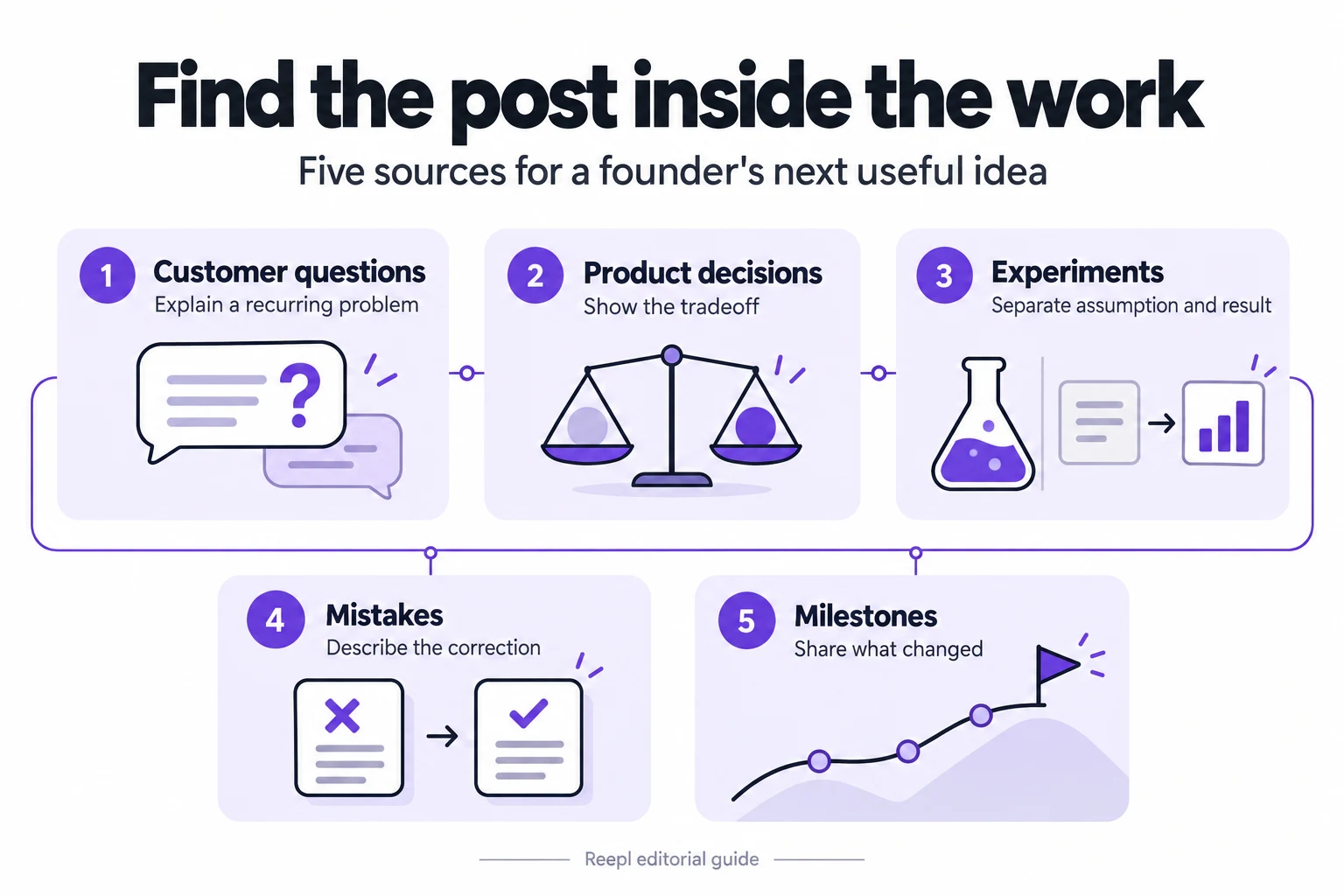
Which customer questions make useful posts?
Customer questions reveal where a practical explanation is missing.
1. The question that keeps returning on sales calls
Find a repeated question in your notes. Follow GOV.UK’s note-taking guidance: keep observations separate from interpretations.
Illustrative opening: “The migration question to answer first is who owns the old data.” Describe ownership, access and cleanup before discussing tools.
2. The workaround a customer built before finding you
Describe the workflow problem behind a manual workaround. A hypothetical operations team might copy approvals from email into a spreadsheet every Friday.
Explain what the workaround preserves, such as visibility, and where it creates extra work. Avoid mocking the spreadsheet: the useful post explains why a reasonable process eventually needs to change.
3. The buyer who should wait before purchasing
Explain a prerequisite that makes your category useful. For example, a reporting product may be premature when nobody has agreed on metric definitions.
Outline what the buyer should settle first and how to recognize readiness.
4. The objection that exposed unclear positioning
Choose an objection you initially answered poorly. Illustrative angle: buyers kept asking whether a workflow product replaced their project manager.
Explain which sentence in your messaging encouraged that interpretation, then show the clearer version.
5. The support answer worth making public
Take a recurring how-to answer and make it useful outside your product. A permissions question could become a checklist for deciding who can approve changes.
Include the common mistake, the check and the reason. Rebuild visuals with dummy data.
GOV.UK’s research privacy guidance recommends fully anonymising research data used in public findings.
6. The language customers use differently from your team
Compare an internal label with the language customers actually understand. A hypothetical team might call something “workflow orchestration” while buyers say “knowing whose turn it is.”
Explain the misunderstanding and show a plain-language alternative. Paraphrase customer language unless you have permission to quote it, and avoid presenting a composite as one person's statement.
7. The question you cannot answer yet
Share an unresolved question with a clear boundary. For example, you may not know whether buyers prefer monthly summaries or event-based alerts.
Explain what evidence would help and what you will observe next. Do not imply that a handful of comments will settle the decision.
8. The handoff buyers underestimate
Explain one transition that causes confusion: sales to onboarding, implementation to support, or trial to paid use. A hypothetical onboarding post could list the three decisions a buyer should settle before inviting colleagues.
Show the handoff artifact, such as a responsibility table, and explain who should complete it.
How can product decisions become useful posts?
Product decisions make stronger material when readers can see the constraints. Show what you considered, what you chose and what would make you reconsider.
9. The feature you deliberately postponed
Explain a real deferral without turning it into a claim of exceptional discipline. Illustrative angle: the team postponed dashboard customization to fix inconsistent definitions.
Show the dependency and the cost of waiting. End with the condition that would put the feature back on the roadmap, rather than a vague promise to build it later.
10. The default setting that required a debate
Choose a setting that affects how people use your product. A hypothetical export tool might default to excluding archived records.
Explain the competing needs, the decision and the visible control available to users.
11. The manual step you kept
Describe a point where a person still needs to make a judgment. For example, a proposal workflow might require review before sending terms to a buyer.
Explain what information the reviewer adds and when the step becomes burdensome. Give readers a way to distinguish useful review from approval that has become a habit.
12. The request that belonged in documentation
Use a real request that better instructions could address. A hypothetical customer might ask for a new status when the existing statuses have unclear definitions.
Explain how you diagnosed the gap and revised the explanation.
13. The smallest useful version of an idea
Show how you reduced a broad request to a narrow test. “Better reporting” could become one weekly view showing overdue approvals.
State the user, the decision that view supports and what you excluded.
14. The design you rejected
Compare two approaches using a concrete constraint. A hypothetical scheduling screen might offer more flexibility but make common actions harder to find.
Show a simplified sketch or explain the difference in words. Describe the scenario you prioritized and acknowledge who might prefer the rejected option.
15. The constraint customers cannot see
Explain a hidden dependency that affects a visible promise. A data import may need validation before progress reaches completion.
Describe what can fail, what the user sees and how you communicate uncertainty. The post should help a buyer plan their work, without becoming an excuse for a confusing or unfinished experience.
16. The boundary of your product's responsibility
Describe where your product stops and another process begins. A hypothetical approval product can record a decision without determining whether the decision is wise.
Make that boundary concrete with a scenario and an ownership rule.
Which mistakes are worth discussing publicly?
Choose mistakes you can explain accurately and responsibly. A useful account includes the assumption, the consequence you can verify and the change you made afterward.
17. The metric you interpreted too quickly
Explain why a number looked more conclusive than it was. Hypothetically, increased trial registrations might include people outside the intended market.
Show the extra question you now ask before celebrating. If you include actual figures, define the period and population.
18. The process that solved yesterday's problem
Describe a rule that outlived its purpose. A hypothetical founder might review every small website change after one early mistake, then realize the rule delays routine edits.
Explain the replacement criteria and which changes still need review. Keep accountability with the process owner instead of using the story to criticize a colleague.
19. The launch checklist item you missed
Choose a bounded omission, such as forgetting the help article for a changed setting. Explain the confusion it created and add the exact checklist line you now use.
Readers should leave with a practical addition they can evaluate against their own release process.
20. The promise you made before checking dependencies
Explain how an estimate became a commitment too early. A hypothetical integration date might depend on a customer's security review.
Show how you now separate your work from external dependencies.
21. The meeting that lacked a decision owner
Describe a discussion that produced activity without a clear decision. Show the change you made to the agenda: decision needed, owner, evidence and deadline.
An illustrative opening could be, “Our planning agenda listed topics but never named the decisions.”
22. The assumption a simple observation challenged
Use an observation that made you revisit a belief. A hypothetical founder may expect customers to start with the dashboard, then notice that onboarding calls begin elsewhere.
Explain what you observed and what remains uncertain. Separate observation from interpretation so readers can see why you changed the next question you asked.
23. The advice that did not fit your situation
Take familiar advice and name the condition under which it became unhelpful. For example, shipping a smaller version may fail when the omitted piece is required for the core task.
Describe the dependency and a better decision rule. Avoid attacking a slogan alone; show the specific situation that makes your qualification useful.
How do milestones become more than announcements?
A milestone earns a reader's attention when it explains a change they can understand.
24. The first customer who completed a workflow unaided
If you have observed this milestone, explain what “unaided” means and what made it possible. Describe the instructions, defaults or onboarding changes involved.
Do not turn one completed workflow into proof that onboarding is solved. Share the next friction point you will check and a question readers can use to evaluate their own setup.
25. The release that removed something
Announce a subtraction with a reason. A hypothetical product might remove duplicate status labels after documenting their overlapping meanings.
Explain what existing users need to do and what remains available. A before-and-after table can make this tangible.
26. The first role you stopped owning
Describe a responsibility you handed over and the information needed to make that transfer work. Share a role brief or decision checklist with private details removed.
Avoid making a new colleague's performance the subject of a public leadership lesson without their agreement.
27. The milestone that changed your operating routine
Choose an event that created a practical need: more customers, another market or a larger team. Explain which routine changed and why.
A hypothetical founder could introduce a shared incident log when informal messages stop giving everyone enough context. Use actual scale figures only when they are accurate and approved for disclosure.
28. The anniversary question you can now answer differently
Revisit a question from an earlier stage of the business. Explain what you believed then, what you learned and what remains unresolved.
Readers should see the evidence behind the revised view, not just a declaration of growth.
29. The customer milestone you can celebrate with permission
If a customer approves a public account, explain the work behind their achievement and keep attribution precise. Describe your product's role without taking credit for the whole result.
Agree on names, numbers and wording before publishing. When permission is unavailable, write about the general workflow using an explicitly hypothetical example instead.
30. The quiet milestone nobody outside the team noticed
Choose an operational improvement that matters to the reader: a documented recovery process, a clearer handoff or a completed accessibility review. Explain what changed and its limits.
A hypothetical recovery checklist post might show who makes the next decision during an outage. Avoid turning preparation into a guarantee that nothing will go wrong.
How do you turn one idea into a finished post?
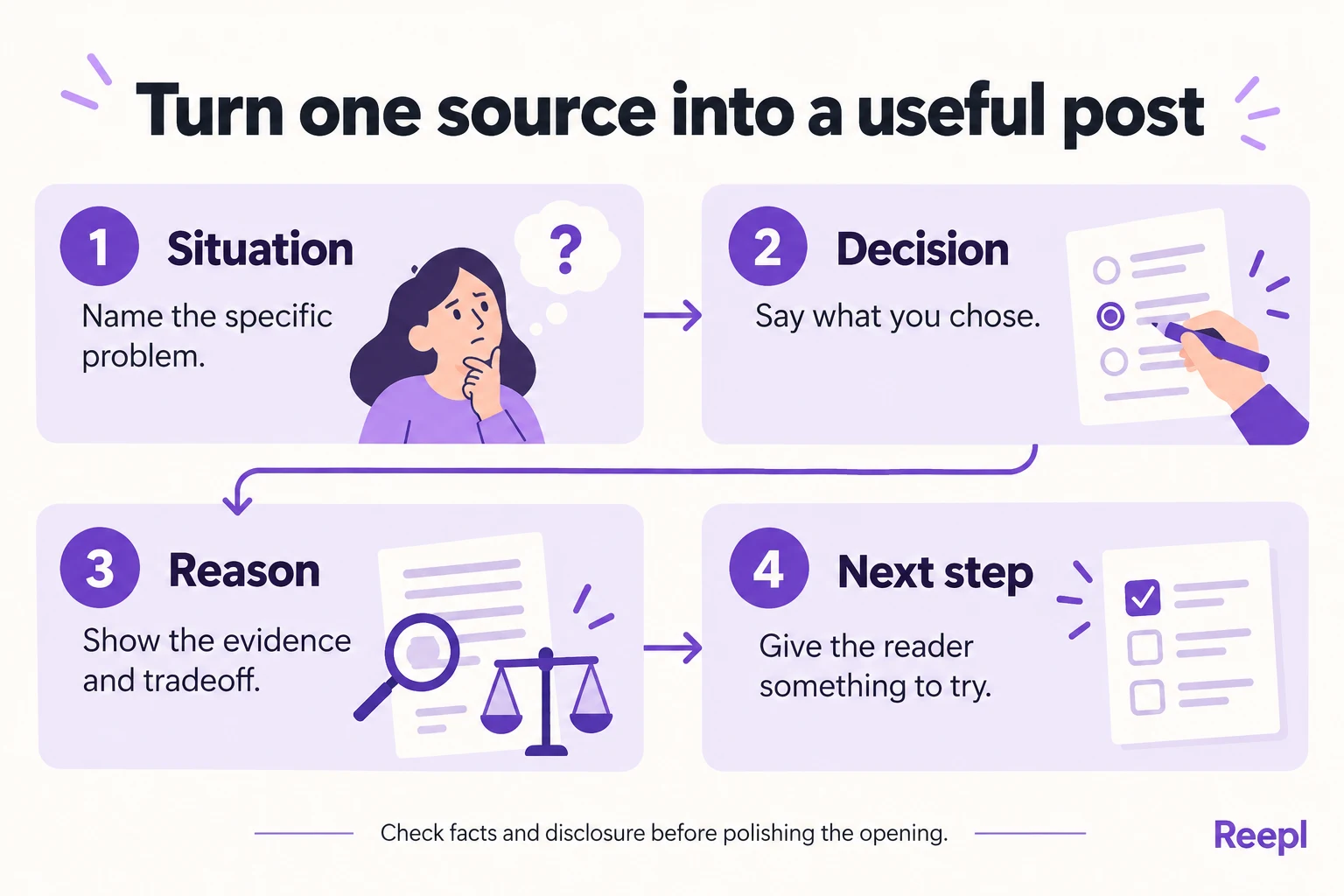
Choose your strongest evidence, then write the situation, decision, reason and reader's next step.
For an illustrative postponed-feature post, the raw note might be: “Customers requested custom reports, but teams disagree about what counts as overdue.” The useful argument is that customization depends on shared definitions.
Explain the definition problem, the narrower change you chose and the check readers can run before commissioning a dashboard.
Read the draft aloud and replace phrases you would never use in conversation. Our guide to teaching AI your writing style goes deeper on that edit.
Use the four-week founder calendar to turn selected ideas into draft briefs and review dates.
Specific language and honest reasoning can establish a recognizable voice. Ask whether each personal detail adds understanding before including it.
Choose one idea above, open the source behind it and draft the explanation you would give a thoughtful customer.
Put your next idea into words
Draft in your voice, review the details, and choose what to publish.
![A LinkedIn® content calendar for busy founders [Free template]](/blog-images/linkedin-content-calendar-for-founders/cover-v2.webp)