Before comparing LinkedIn® outreach automation products, check whether the activity you plan is allowed under LinkedIn®'s rules, because no vendor setting makes it safe. Then match the product to your workflow: Zeekeo adds a managed service, Expandi and Skylead build conditional sequences, Linked Helper runs on a desktop, and Octopus CRM works as a focused browser extension.
Key takeaways
- This comparison covers ten products with documented LinkedIn® outreach or prospecting automation; post writers and analytics tools are left out.
- Zeekeo offers self-serve Launchpad software and a separate managed service. PhantomBuster requires further current documentation before its workflow can be assessed here.
- Compare the plan needed for your complete sequence, not just the cheapest advertised subscription.
- Cloud execution, desktop software and browser extensions create different operating requirements. Cloud data storage does not necessarily mean cloud execution.
- Vendor screenshots show the interface and workflow; response rates, campaign results and platform approval need other evidence.
What counts as a LinkedIn® automation tool in this comparison?
We use LinkedIn® outreach automation to mean software that executes prospecting or outreach actions, such as connection requests, messages, follow-ups or lead-processing workflows. A sequence is an ordered set of actions with delays or conditions between them. For example, the next step may depend on whether someone accepted a connection request.
A post scheduler also automates work, but it solves a different problem. A writing assistant helps you prepare a message; an outreach system can execute a campaign. An analytics dashboard reports what happened. You should not have to compare those three categories as though they were interchangeable.
That is why Buffer, Hootsuite, Shield and general-purpose post generators are not ranked here. They can be useful in a broader marketing workflow, but this article answers a narrower buying question: which product supports the prospecting and outreach process you need?
Evidence and scope, October 2026: we reviewed the official public pages linked below. This compares documented product positioning; we ran no sending experiment, performance ranking or account-safety test. Each product description below is the vendor’s own offering, never an independent result or a certification of platform permission, and we publish no activity allowance. PhantomBuster’s retrieved homepage required JavaScript, so its current plan details remain unverified here.
Platform rules: the LinkedIn® User Agreement restricts unauthorized automated methods and scraping, including certain contact and messaging actions. The Professional Community Policies also govern authentic participation. No delay, daily cap, dedicated IP, cloud deployment, or vendor safety claim creates a safe automation limit or platform permission. Evaluate whether the intended activity is allowed before evaluating convenience.
Which tools belong on your shortlist?
| Product | Workflow to examine | Key buying question |
|---|---|---|
| Zeekeo | Software and managed outbound services | Who supplies and operates the campaign? |
| PhantomBuster | Automation workflow candidate | Can the vendor demonstrate the current required workflow? |
| Dripify | Outreach sequences and team operations | How are replies assigned and pending actions stopped? |
| Expandi | Conditional campaign design | Can an operator explain every branch? |
| Waalaxy | Pre-built outreach sequences | Do the entry and stopping conditions fit? |
| Dux-Soup / STACKED | Campaign and lead-management workflow | What execution and maintenance does the quoted setup require? |
| Linked Helper | Desktop campaign software | Who owns installation, access, and recovery? |
| Meet Alfred | Several outreach channels and an inbox | How are cross-channel replies coordinated? |
| Octopus CRM | Focused account-action campaigns | Which actions are actually needed and permitted? |
| Skylead | Conditional multichannel sequences | What happens when a channel is unavailable? |
1. Zeekeo: when do you want software and outbound support together?
Zeekeo Launchpad is worth evaluating when you want to run outbound in one workspace, with the option of handing execution to a managed team. Zeekeo separates its DIY software from its done-for-you service. That distinction matters when comparing it with subscriptions that give you software but leave campaign operations entirely to your team. Official product page, reviewed October 2026.
Its published offering includes LinkedIn® and email outreach, AI-assisted messaging, campaign automation, dashboards and CRM integrations. Calling workflows are also part of its broader outbound offering. This gives it a place in an outreach comparison independently of its content creation features.
For Zeekeo, request separate descriptions of software access and managed-service work. Establish who supplies campaign material, who approves it, and who owns replies. A quote should make those responsibilities visible before you compare its price with a software-only subscription.
Trade-off: an integrated platform is only useful if your team will use the additional channels. For a narrow connection-and-follow-up task, compare the total cost and setup effort with a focused tool. Ask the demo presenter to show your exact workflow, including reply handling and how replies reach your CRM.
2. PhantomBuster: when do you need connected prospecting workflows?
PhantomBuster remains a named candidate from the previous comparison, but its retrieved homepage required JavaScript in our October 2026 review. That retrieval limitation says nothing about whether the service is available; it means this article cannot confirm the current plan or reproduce detailed workflow claims from that page.
If you are considering PhantomBuster, ask for a demonstration of the exact process you need, including source inputs, account permissions, resource consumption, and how replies affect pending actions. Confirm which components are separate services and what information passes between them. A workflow diagram alone does not show those boundaries.
Get current terms before deciding, because an old price or resource allowance may no longer apply, and identify who operates the workflow after setup. If those answers are unavailable, leave the candidate unranked: missing evidence counts neither for nor against the product.
3. Dripify: when is a sales-team campaign workspace useful?
Dripify is a candidate for teams that need outreach sequences, campaign reporting and a place to handle replies. Its current product pages describe LinkedIn® and email actions with delays and conditions, alongside an inbox and team-management features. Official product page, reviewed October 2026.
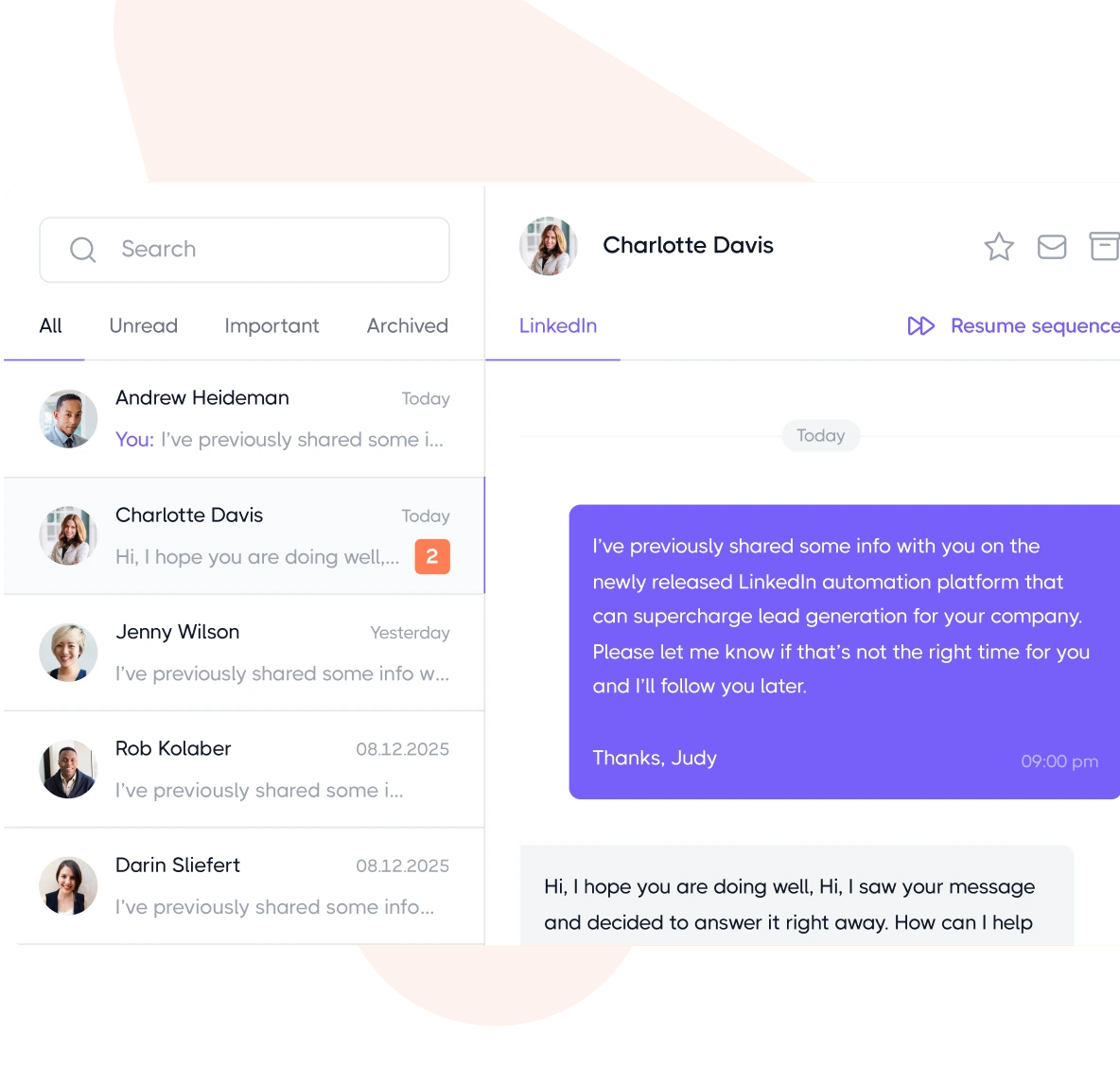
The useful comparison is what happens after a campaign starts. A representative needs to see the conversation, understand earlier contact and take responsibility for the next reply. An inbox can be more valuable than another personalization variable if messages otherwise get missed.
For Dripify, ask which quoted plan includes the team and inbox functions your reply process needs. Have the vendor show how an operator identifies the owner of a conversation. Record any workflow that still requires a separate system or a manual status update.
Trade-off: a shared sales process requires more than access to a sequence builder. During evaluation, check which plan includes the inbox, reporting and team controls you need. Have a second team member review a sample conversation and explain how they would take it over without sending a duplicate follow-up.
4. Expandi: when do campaign conditions matter?
Expandi is a cloud outreach option to evaluate when different prospect responses should lead to different campaign paths. Its Smart Sequences combine actions and conditions, while its wider offering covers LinkedIn® outreach, email and campaign management. Official product page, reviewed October 2026.
Conditional sequencing means the next step can depend on an earlier event. That is useful when a single fixed chain would keep treating every prospect the same way. The practical buying question is whether the product supports your required conditions and whether the person operating it can understand the resulting sequence.
For Expandi, include the cost of any email accounts and integrations needed by your proposed branches. Ask the presenter to show where a sequence can be paused and how an operator identifies pending actions. Confirm which plan includes each demonstrated condition, since the least expensive one may not.
Trade-off: additional branches create more cases to review. Before purchasing, draw your intended sequence and ask the vendor to demonstrate the accepted, unanswered and replied paths. Confirm where the automation stops and a person takes over.
5. Waalaxy: when would pre-built sequences help?
Waalaxy is worth evaluating when you prefer starting from pre-built outreach sequences. Its product pages describe connection requests, messages and automated follow-ups, with email outreach available in its multichannel offering. Confirm the current campaign-status and reporting workflow directly in a demonstration. Official product page, reviewed October 2026.
Templates can give a new operator a clearer starting point than an empty workflow canvas. The important distinction is between choosing a sequence and choosing the message: a supplied structure does not know why a particular person should hear from your business.
For Waalaxy, compare the specific sequence you need with the included channel access. Ask whether a change to a template affects existing campaigns or only new ones. Get that answer from the current product, because sequence builders differ.
Trade-off: ask how the system handles existing campaign membership, duplicate records, and a prospect who has already replied. A pre-built sequence does not remove the need to understand its entry conditions and stopping rules. Evaluate those cases in a demonstration before deciding whether the workflow fits.
6. Dux-Soup: should you evaluate STACKED local or cloud?
The Dux-Soup / STACKED page describes drip campaigns, messaging, an inbox, analytics, and lead management. Review the execution model attached to the current quote instead of assuming that an older plan description still applies.
Published capabilities include drip campaigns, connection requests, messages, InMails, delays, response detection and lead-management tools. The local-versus-cloud choice concerns where that work runs, not whether the software belongs in the automation category.
For Dux-Soup / STACKED, the quote should identify local or cloud execution explicitly. Include the cost of the machine and maintenance when relevant. Ask what remains accessible when the operator is offline and what must be restarted after an interruption.
Trade-off: local execution gives you a machine to maintain. Hosted execution changes the operating cost and account-access arrangement. Before comparing prices, decide who is responsible for keeping the system available. Ask how an interrupted campaign resumes and how a responding prospect is removed from further automated follow-ups.
7. Linked Helper: when does desktop execution fit?
Linked Helper describes desktop automation and lead-management capabilities on its October 2026 page. Ask the vendor to distinguish where account actions run from where workspace data is stored; those are separate operational questions.
A VPS is a remotely hosted computer you operate. It can provide a place for desktop software to run, but it brings its own cost and maintenance. Buying cloud data storage alone does not remove that execution requirement.
For Linked Helper, budget for the execution environment as well as the license. Have the vendor explain the selected storage arrangement, export process, and responsibility for backups. Moving data to hosted storage and moving account execution are different changes with different operational consequences.
Trade-off: someone must own the machine and session. Evaluate installation, updates and recovery as part of the buying decision. Ask your operator to explain where campaign data lives, how it is backed up and what happens when they change computers. Those answers matter more than a small difference in subscription price.
8. Meet Alfred: when do you want several outreach channels?
Meet Alfred is an option for teams evaluating LinkedIn®, email and X outreach alongside a CRM and inbox. Its published feature set includes multichannel sequences, reporting, team collaboration and cloud infrastructure. That outreach functionality is the reason it belongs here, independently of its social-post scheduling features. Official product page, reviewed October 2026.
A multichannel sequence connects contact steps across more than one channel. The intended benefit is coordination: the operator can assess the whole conversation instead of managing unrelated activity in several tools.
For Meet Alfred, ask for the plan covering the particular channels and team roles in your brief. Identify any separate email-service costs. An attractive combined price is only meaningful when the quoted workflow includes the reply handling and access controls your team actually needs.
Trade-off: a long feature list can hide plan boundaries. Ask which channels, inbox functions and team permissions are included in the quoted plan. Then have the vendor demonstrate a reply arriving on one channel while another step is pending. You need to understand that transition before paying for a broad workflow.
9. Octopus CRM: when is a focused campaign tool enough?
Octopus CRM is a browser-extension option built around prospect lists and action-based campaigns. Its official site documents personalized connection requests, messages to existing connections, profile visits and endorsements, plus a dashboard for campaign management. Official product page, reviewed October 2026.
That is actual outreach automation, even though it is a more focused proposition than an entire outbound platform. A buyer whose workflow is mainly connection and messaging campaigns can evaluate those functions directly instead of paying for channels they will not operate.
For Octopus CRM, identify which campaign functions are essential before selecting a tier. Ask how you can inspect pending work and remove a prospect from the process. A narrow purchase can still require careful operational review when it executes actions on an account.
Trade-off: assess the exact plan's funnel, integration and activity-control features. Also distinguish a vendor's safety claims from the platform's rules. During a demo, check how the tool handles a prospect who has already been contacted and where the operator sees messages that need a human response.
10. Skylead: when do you need LinkedIn® and email branches?
Skylead is worth evaluating when your outreach process needs LinkedIn® and email steps in a conditional sequence. Its Smart Sequences combine actions and conditions, while its published offering also includes email discovery and verification. Ask the vendor to demonstrate the branching approach with your proposed conditions. Official product page, reviewed October 2026.
The useful question is not how many steps a sequence can contain. It is whether a contact's available information and response determine the next appropriate action. A workflow that switches channels without checking context can still produce a poor conversation.
For Skylead, include the resources required for email discovery, verification, and delivery where relevant. Ask how unavailable information affects a branch and what an operator sees when a step cannot complete. Record those conditions alongside the quote, so the evaluation covers imperfect contacts as well as ideal ones.
Trade-off: the broader workflow also needs email accounts, delivery monitoring and clear reply ownership. Ask the vendor to show how the sequence behaves when an email address is unavailable or a prospect answers elsewhere. Include those cases in your evaluation instead of judging only the ideal path.
How should you compare these tools with your own workflow?
Give each shortlisted vendor the same scenario. This makes the comparison about the job you need done instead of the features a sales demonstration happens to emphasize.
Illustrative evaluation brief: imagine a small B2B software team with an existing CRM and one person responsible for outreach. It needs a consistent way to prepare a campaign, review the messages, identify replies and hand interested conversations to a salesperson. This is a planning example, not a measured customer result.
- Define the audience and reason for contact. Write down the role, company characteristics and specific problem you can help with. Ask what information the tool needs and where that information comes from. A list of job titles alone leaves out why this person should hear from you.
- Map the conversation. Include the initial contact, an unanswered path, an interested reply and a negative reply. Ask the vendor to show each case. A polished demonstration of the initial send tells you little about the follow-up work.
- Assign human ownership. Name the person who approves copy, handles replies and pauses a campaign when circumstances change. If two people share responsibility, ask how the product prevents confusion about the next action.
- Trace the CRM handoff. Identify the fields, statuses and notes your salesperson needs. Ask whether the required integration is included, requires another service or needs configuration. Check for duplicate records before assuming that an integration label solves the entire task.
- Price the complete setup. Include the required seats, billing commitment, email accounts, enrichment allowance and any machine or hosting costs. For a managed service, separate software access from the work a team performs on your behalf.
- Review the exit path. Ask what you can export, what remains after cancellation and who owns the campaign materials. Compare that answer with your team's requirements before committing to a long billing period.
For this example, Zeekeo belongs on the shortlist if the team also wants operational support. PhantomBuster needs current documentation before you can decide whether it fits connected lead-processing work. A focused sequence product may fit if the team already has data, messaging and CRM operations covered. The best choice follows the missing part of the process.
Which buying mistakes are easiest to avoid?
Each of these five buying mistakes has a simple check you can run before signing.
- Reading a vendor limit as permission. A tool's configured capacity describes what the software can do. Whether LinkedIn® permits the activity depends on its published rules and your organization's requirements, so check both before connecting an account.
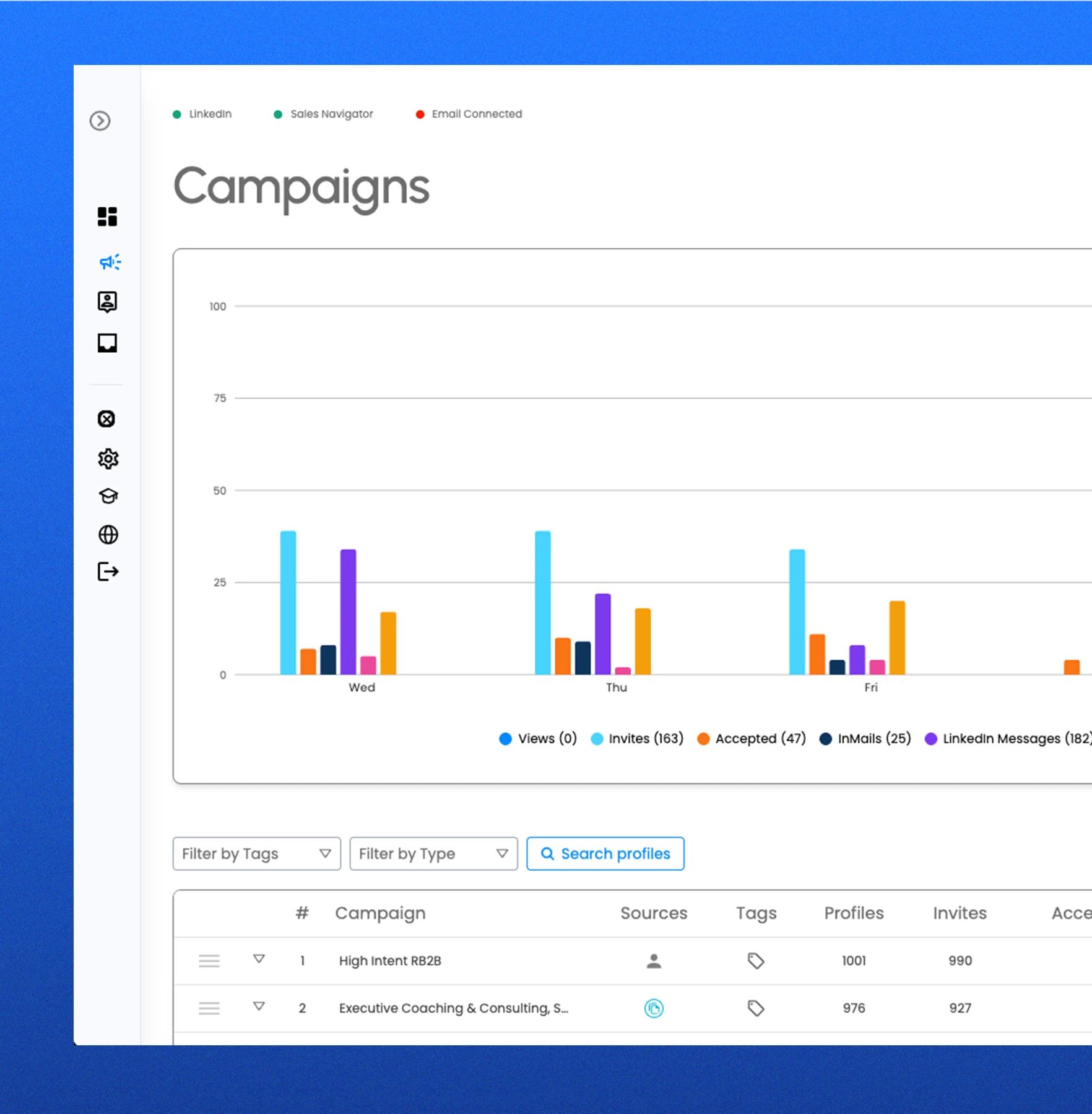
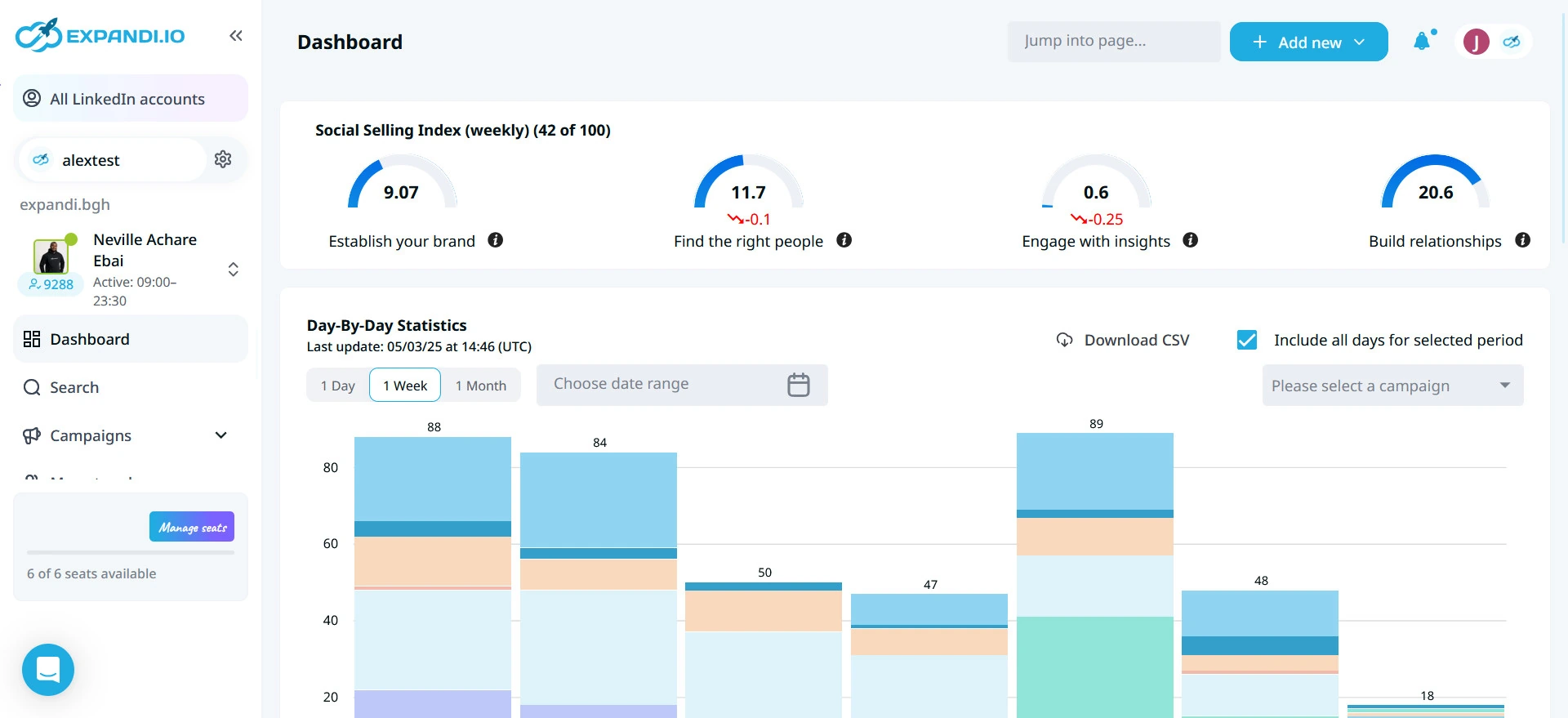
- Reading a screenshot's numbers as a benchmark. A campaign dashboard shows what the product measures, and an example acceptance or reply rate cannot predict your results. A defensible performance comparison would need a stated audience, message, time period and method. We have not run that experiment.
- Buying the entry plan before mapping the entire workflow. A feature you need after the first step may be gated to another tier. Write a short acceptance checklist, using the template below, and ask the vendor to identify the plan that satisfies every item.
- Equating more channels with better targeting. A relevant message on an appropriate channel is a different goal from repeating the same pitch in several places. Evaluate whether the product helps your operator maintain context and respond thoughtfully.
- Comparing a managed service and a software license as equivalent purchases. Ask who supplies the audience definition, copy, lists and ongoing work. The difference in responsibility can explain more of the price than the feature table does.
Acceptance checklist template, one line per workflow step:
- Step: [for example, an interested reply reaches the salesperson with its notes]
- Shown in the demo: [yes or no, and the date]
- Plan that includes it: [plan name and billing term]
- Extra cost: [seats, email accounts, enrichment or hosting]
- Owner after purchase: [the person who runs and pauses it]
Where does Reepl fit if your goal is publishing?
Reepl is an AI writing platform for professionals. It helps with deciding what to say, drafting in your own voice, and managing your own publishing workflow. It is not an outreach automation tool and should not appear in a table of connection-request or prospect-messaging systems as a safer substitute.
For comments and messages, Reepl drafts text for you to review, edit, and send. For your own posts, you choose the review and scheduling controls. If writing and maintaining a calendar are the actual problems, explore the content scheduler and AI Post Writer as a separate category.
Choose the category before evaluating a subscription. A desire for more relevant business conversations may be better served by clearer positioning, useful public writing, and thoughtful individual outreach. Relevance, consent and platform permission are decisions people make; software cannot supply them. Keep those decisions visible instead of treating campaign volume as the goal.
What should a responsible evaluation document contain?
Write a decision record before granting account access. Include the business purpose, the exact actions proposed, the source of contact information, the platform rules that apply, and the person accountable for the decision. If the intended action conflicts with a platform restriction, a better message or lower activity setting does not resolve that conflict.
Separate capability evidence from outcome evidence. A product page can establish that a vendor advertises an inbox or sequence editor. It cannot establish that your campaign will earn replies, that the audience wants contact, or that the platform approves the execution method. Require a different kind of evidence for each question instead of letting a polished demonstration answer all of them.
Use an illustrative scenario to inspect the interface without initiating account actions: a recipient answers a question, another declines, and a third has already spoken to a colleague. Ask the demonstrator to explain ownership and stopping behavior in each case. Record unresolved questions, so the happy path never stands in for every conversation.
Finally, identify an alternative that does not require the disputed activity. That may be individual outreach, a public resource, a clearer website, or a writing workflow that helps your expertise become easier to discover. The comparison is complete only when you can explain why the chosen process is appropriate, not merely why a tool can execute it.
Build a consistent publishing routine
If your goal is publishing your own posts, explore Reepl’s content workflow separately from outreach automation.