AI for LinkedIn® content works when the model writes in your voice, not a generic corporate one. The reliable workflow: train an AI on your own past posts, let it draft, then review and send every post yourself. Skip the voice training, or auto-post from a bot, and both your reach and your credibility suffer.
What "AI for LinkedIn® content" actually means in 2026
Ask ten LinkedIn® creators what "AI for LinkedIn® content" means and you will get ten different answers, because the term now covers a wide spread of behavior. At one end, someone opens ChatGPT, types "write me a LinkedIn® post about remote work," and pastes the output straight into the editor. At the other end, a founder has trained a copilot on two years of their own writing, drafts every post inside that learned voice, and edits before sending. Both count as "using AI for LinkedIn® content." Only one of them reliably works.
Strip away the marketing and there are three jobs people actually hire AI for on LinkedIn®: ideation (what should I write about this week), drafting (turn a rough idea into a full post), and editing (tighten a draft you already wrote). There is a fourth job AI should never be handed: the send button. Reepl's workflow, and this playbook, holds that line on purpose. AI drafts. A human reviews and publishes. No bot posts, comments, or messages under your name.
Where you sit on the spectrum, from a single generic prompt to a voice-trained copilot, decides almost everything about whether the output reads as you or reads as "AI wrote this." The rest of this guide is about moving from the first to the second.
Why generic AI output fails on LinkedIn®
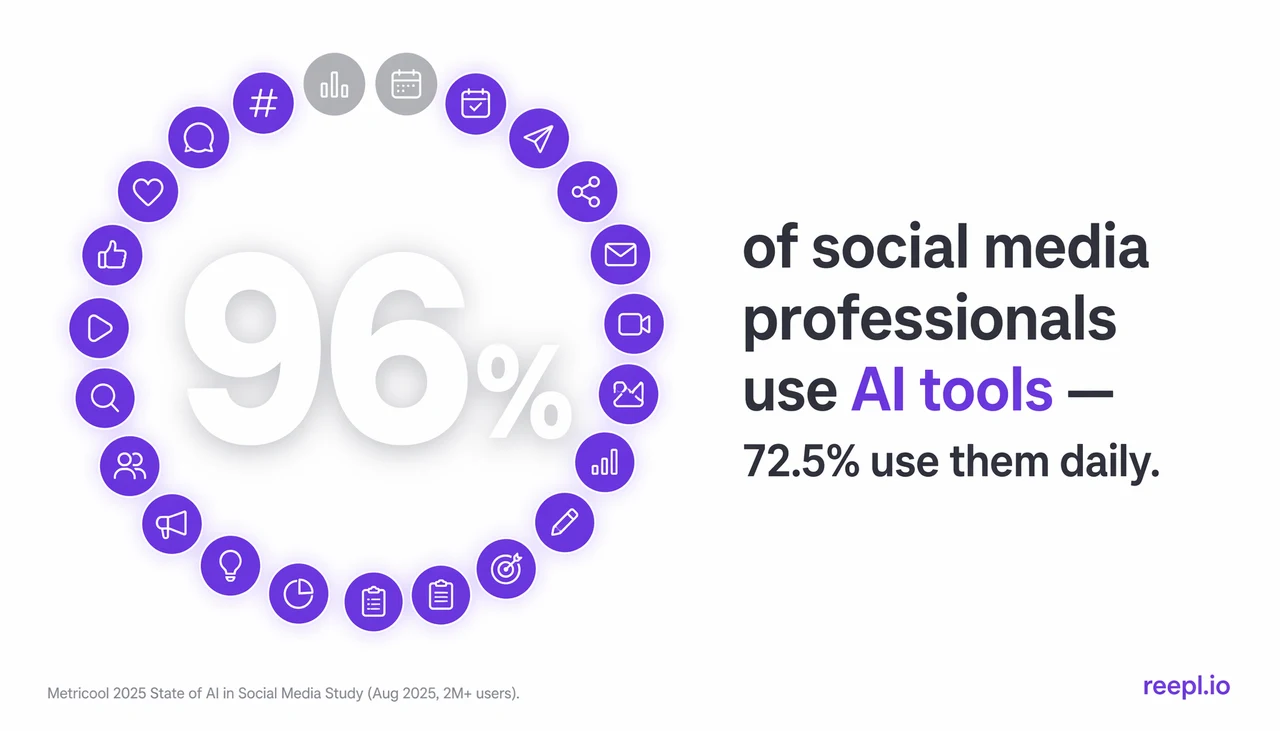
AI adoption itself stopped being a differentiator a while ago. Metricool's 2025 State of AI in Social Media study puts overall AI-tool use among social media professionals at 96%, with 72.5% using AI daily. Everyone is already doing it, so "I use AI" is not a positioning statement anymore. What still separates a post that works from one that gets scrolled past is whether it sounds like a specific person.
Left ungrounded, most language models converge on the same "professional enterprise" voice: utilize, leverage, "in today's rapidly evolving landscape," seamless, game-changing. You have read a hundred posts that open with a bolded one-line hook, three humble-brag paragraphs, and a "thoughts?" at the end. That is not a coincidence. It is what an unguided model defaults to when nobody has told it what your voice actually sounds like.
Two structural problems compound this:
- The model does not know your week. It cannot invent the client call that changed your mind, the number from your dashboard this morning, or the opinion you argued about at dinner. Those specifics are what make a post read as written by a person, and no prompt can manufacture them.
- Reach is already compressed. AuthoredUp's 2025 Algorithm Insights study, an analysis of 621,833 LinkedIn® posts, found average reach dropped 34% across 2025. A generic post starts that race already behind. A distinct one gives the algorithm, and the reader, a reason to stop scrolling.
The voice-match approach
A voice model is not learning facts about your business, this week's news, or your opinions. You still supply those. What it learns is closer to a fingerprint: sentence-length variance, punctuation habits, the words you reach for, where you put the joke, how blunt or hedgy you tend to be. Feed it enough of your own writing, past LinkedIn® posts plus longer-form pieces like newsletters or blog posts widen the sample, and it starts producing drafts that sit inside your normal range instead of a generic average.
Reepl builds this as a persistent voice profile: trained on your past posts and writing samples, reusable across every generation surface in the product, the composer, the copilot, the Andy agent. Agencies get a separate profile per client, so a ghostwriter running ten accounts is not fighting one blended voice across all of them. For a closer look at what makes a draft actually pass as human, see can AI write LinkedIn® posts that sound human.
The human-in-the-loop workflow
The workflow that actually holds up is draft, review, send, in that order, with a human owning the last step every time. Reepl publishes through LinkedIn®'s official OAuth API (scopes: openid, profile, email, w_member_social), not cookie scraping or shared credentials, so there is no automation-detection exposure built into how the post reaches LinkedIn®. A human clicking send on every post means there is no bot-detection exposure built into the fact that it was published at all.
This also beats the alternative that leaned harder into automation over the last year: commenting and DM bots. LinkedIn®'s August 2025 update reduced the visibility of automated comments specifically, which means human-sent engagement, even AI-drafted, human-reviewed engagement, keeps working exactly as before. What "no auto-post" costs you is a few seconds of review per post. What it protects is your account, and longer term, your credibility with the people reading you.
The step-by-step workflow
- Train the model on your voice. Upload past posts and any long-form writing you have, then save it as a voice profile.
- Capture the raw idea. A rough thought, a note, a reply you wrote somewhere else, supply the one specific detail the model cannot know on its own.
- Draft with a copilot, in your voice. Use an in-composer chat that iterates with you across turns rather than a single generate-and-done prompt.
- Edit for the human signals. A first line that stops the scroll, one concrete detail nobody could have invented, your actual speaking cadence.
- Read it cold. Does it sound like you, or like a press release? If you would not say the line out loud, rewrite it.
- Send it yourself. Through the official API, at a time your audience is actually online.
For the recurring drafting work, an AI ghostwriter agent like Reepl's Andy (Premium plan) can run against the same voice profile and keep surfacing drafts for your approval. It writes ahead of you. It does not publish ahead of you.
The 2026 AI-for-LinkedIn® tool landscape
Four rough categories cover most of what is on the market: one-shot prompting inside ChatGPT or Claude directly, template-based generation tools, formatting-and-analytics layers with no generation at all, and voice-trained copilots.
Where the named tools sit: Taplio leans template-based, useful for volume, weaker on voice fidelity. AuthoredUp is a formatting-and-analytics layer with no AI generation built in. Supergrow does narrower AI writing without a per-client voice-profile layer. None of the three publish through a documented voice-training system with separate profiles per client the way Reepl does.
What actually matters when evaluating any of these: voice fidelity (does it learn from your writing, or apply one house style to everyone), official-API publishing instead of scraping or shared cookies, model choice, and a human-in-the-loop default rather than an automation-first one. On model choice specifically, Reepl supports BYOK, bring your own OpenAI, Anthropic, Gemini, or OpenRouter key, so a cost-conscious user can run Copilot on their own account. Claude Opus is available BYOK at every plan tier.
Prompts that produce human-sounding drafts
"Write like me" as a single prompt is weak, because a general model only sees one sample of your voice inside that conversation's context window, and it resets the moment you open a new chat. Prompts that hold up better force in a specific detail the model cannot fabricate:
- The specific-detail prompt: "Turn this into a post: [paste one real thing that happened this week]."
- The contrarian-take prompt: "Everyone in my field believes X. Argue the opposite, using my actual reasoning: [your reasoning]."
- The story-from-a-number prompt: "Here is one metric from this week: [number]. Write the story behind it."
- The lesson-learned prompt: "Here is something I got wrong: [mistake]. Write what I would tell someone about to make the same one."
- The reframe-a-comment prompt: "Turn this comment I left into a full post: [paste your comment]."
A self-review pass, "find and cut anything that sounds like AI wrote it," is worth running on any draft before it ships. When a copilot is available, it beats prompting for anything you will write more than once, since it keeps the voice profile loaded and iterates with you instead of starting cold every time. A sharp opener still does a lot of the work; the free Hook Generator is a quick way to test a few before you commit to one.
Measuring authenticity
Four checks, roughly in order of how fast they catch a problem:
- The cold-read test. Would a colleague know it was you without the byline?
- The one-detail test. Is there one thing in the post no AI could have invented?
- The cadence check. Read it out loud. Does it match how you actually talk?
- The reach signal. Track whether your voice-matched posts outperform your old generic-AI baseline over time.
There is also a compounding argument for staying consistent. One directional finding from Profound's AI-search research suggests AI assistants tend to cite writing published within the last few months noticeably more often than older pages. It is not a precise, verified number, but it points the same direction as everything else here: publish regularly, in a voice that is recognizably yours, and freshness and authenticity compound together instead of competing.
Common failure modes
- Skipping voice training entirely and prompting a blank model every time.
- Auto-posting without review, which risks both your account and a slop-labeled feed.
- Over-editing a draft until 80% of it is rewritten. That usually means the input or the voice profile is wrong, fix that instead of the output.
- Treating AI as the source of ideas instead of the drafter of ideas you already had.
The bottom line
Every fix in this playbook routes back to the same principle: feed the model your own writing, keep yourself on the send button, and treat consistency as part of the strategy, not an afterthought. For a line-by-line pass at removing individual AI "tells" from a draft, see how to stop sounding like AI on LinkedIn®. If you want to see voice-matched drafting working end to end, Reepl's voice profiles are the fastest way to try it.
See Reepl Learn Your Voice
Voice profiles trained on your own past posts, so AI drafts sound like you, not a template.